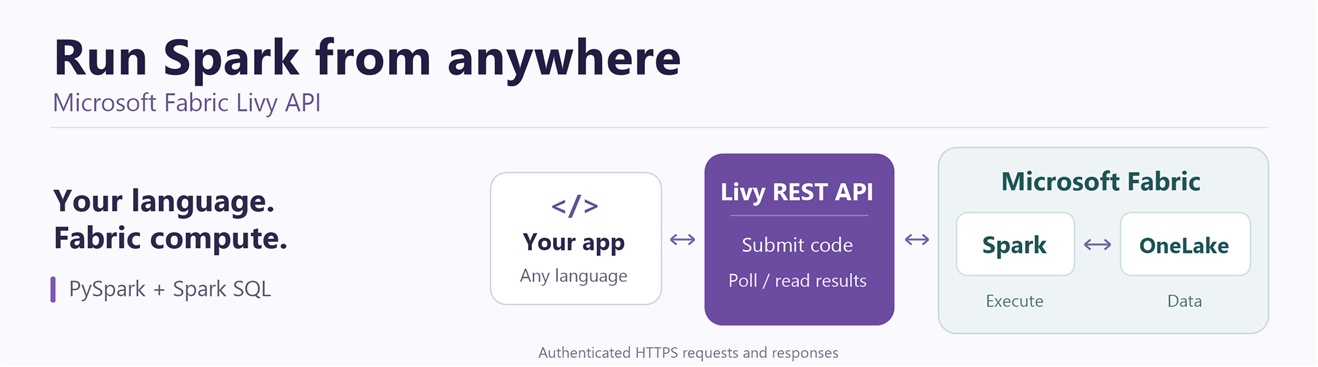
Your application already knows what data it needs. What if it could send Spark SQL or PySpark code to Fabric Spark and get the answer back, without opening a notebook?
That is what the Microsoft Fabric Spark Livy API enables. It is an HTTP interface for starting Spark compute, submitting code, checking execution, and retrieving results. Your application runs locally or in another service; the Spark code runs in Fabric.
Livy is not Python-only. You can call these REST APIs from any programming language that can send authenticated HTTP requests and handle JSON responses, including C#, Java, JavaScript/TypeScript, Go, and Python. We use Python for the examples in this blog, not because the API requires a Python client.
The client language and the code executed by Spark are separate choices. For example, a C# or Java application can submit a PySpark code string and read the result through the same endpoints. Choosing a client language does not mean Spark can execute that language; submitted code must use an execution kind supported by the Fabric Livy endpoint.
We integrated Livy with two familiar Fabric items: a Lakehouse, which gives the API a data context, and an Environment, which lets you customize the execution environment. You do not need to create a notebook or Spark Job Definition just to submit code.
This walkthrough starts with a local Python client, then builds up to batch jobs and High Concurrency.
Think of Livy as the entry point, not the execution engine:
Application (any language with an HTTP client)
        |
        | HTTPS requests + Microsoft Entra token
        v
Fabric Livy API
        |
        v
Fabric Spark <--- Fabric Environment (optional configuration)
        |
        | Read and write data
        v
Lakehouse / OneLake
Your application sends work to Fabric and checks its progress. Spark executes the code; the application reads a small result through Livy or gets the location of output written to OneLake. The Environment configures execution; it is not another service through which the data must pass.
| Component | Its role in the walkthrough |
|---|---|
| Lakehouse | Provides the data context; its tables and files are stored in OneLake |
| Livy API | Accepts code or job submissions and exposes status and results |
| Fabric Environment | Supplies published libraries and Spark settings when selected |
| Fabric Spark | Runs the submitted code on remote compute |
On This Page
- Choose a workload
- Lakehouse and Environment
- Authentication
- Download and run the examples
- 1. Sign in and set the Lakehouse
- 2. Add REST helpers
- 3. Run PySpark and Spark SQL
- Submit Spark SQL directly
- Check Lakehouse data quality
- Attach an Environment
- Submit a batch job
- Use High Concurrency
- Production checklist
When Would You Use It?
| Your application needs to… | Start with… |
|---|---|
| Run PySpark transformations and return a small result | An interactive session |
| Execute Spark SQL and use the rows locally | A statement in an interactive session |
| Run a scheduled processing script and persist its output | A batch job |
| Run several independent Spark workloads concurrently as the same user | High Concurrency sessions |
For example, a data-quality tool can submit checks and display the results in its own UI. An orchestrator can launch a processing job and wait for completion. A developer can explore OneLake data from an application written in their preferred language using an HTTP client.
Livy is the execution interface, not a scheduler or a low-latency database endpoint. Spark startup and job execution still take time. For an application UI, I recommend returning a job ID and checking progress asynchronously instead of holding a web request open while Spark starts.
A Lakehouse Endpoint, with an Optional Environment
Each Fabric Livy endpoint belongs to a specific Lakehouse artifact. Find it under Lakehouse > Settings > Livy endpoint. Its base URL looks like this:
https://api.fabric.microsoft.com/v1/workspaces/{workspaceId}/lakehouses/{lakehouseId}/livyapi/versions/2023-12-01
This integration gives Spark straightforward access to data stored in OneLake. You can query Lakehouse tables and read or write files using OneLake paths. It does not bypass permissions: the caller must have access to the workspace and data.
You can also attach a Fabric Environment artifact when creating a session or batch. That lets you bring published library, Spark configuration, and compute settings to the workload instead of configuring every application independently. Without an Environment override, Livy uses the workspace’s default starter pool.
Choose an Authentication Method
Fabric Livy requests use a Microsoft Entra access token. There are multiple ways to obtain or supply that token:
| Method | How it works | Typical use |
|---|---|---|
| Azure CLI sign-in | Sign in with az login; your client obtains a token for that signed-in user |
A simple local walkthrough like this one |
| Interactive browser sign-in | An approved app opens a browser to sign in the user, using MSAL or Azure Identity | User-facing applications and developer tools |
| Service principal with a client secret | An application authenticates with its tenant ID, client ID, and a securely stored secret | Unattended jobs and services |
| Service principal with a certificate | An application authenticates with a registered certificate and its private key | Unattended jobs using certificate credentials |
| An existing access token | Your client sends a valid token obtained through an authorized flow | Applications that already manage authentication |
These are client authentication choices, not five different Livy authorization models. The identity behind the token is either a signed-in user (delegated) or a service principal (app-only). Supplying a token directly does not change its permissions, and the caller is responsible for renewing it.
For simplicity, every client example below uses Azure CLI authentication. Sign in once with az login, then let AzureCliCredential obtain the token. There is no client secret or certificate to manage in the sample. This is a walkthrough choice, not a Livy requirement; choose the appropriate flow for your production application.
The Fabric Livy authentication guide covers app registration and permissions.
Download and Run the Examples
Start with the complete example ZIP, or download only the script you need. Each local client is standalone: it includes authentication, polling, error checks, and cleanup. No shared helper module or local Spark installation is required.
| Download | Run locally | What to expect |
|---|---|---|
| livy_quickstart.py | python livy_quickstart.py |
PySpark count 3 and Spark SQL rows with IDs 1-3 |
| livy_sql_demo.py | python livy_sql_demo.py |
Structured Spark SQL result: column result, row [[1]] |
| livy_quality_demo.py | python livy_quality_demo.py |
A bounded Lakehouse quality check: 3 rows, 1 missing customer ID |
| livy_environment_demo.py | python livy_environment_demo.py |
Spark SQL result using your published Environment |
| submit_livy_batch.py | python submit_livy_batch.py |
Batch completion and a OneLake output path |
| livy_range_job.py | Upload to OneLake; do not run locally | The remote Spark script used by the batch client |
| livy_hc_demo.py | python livy_hc_demo.py |
One HC context returning Row count: 3 |
| livy_hc_two_contexts.py | python livy_hc_two_contexts.py |
Two submissions before polling, context IDs, results, and an isolation check |
Use Python 3.11+ and Azure CLI. Extract the ZIP into a local folder, replace the ID placeholders in your chosen script, then run:
az login --tenant "<tenant-id>" --allow-no-subscriptions
python -m pip install -r requirements.txt
python livy_quickstart.py
The requirements file records the client package versions used for validation. It is also included in the ZIP. Environment and batch examples have additional setup described in their sections. Scripts contain placeholders, not workspace IDs or credentials.
Tested On
The validation record below distinguishes successful configurations from configuration failures; it is not a guarantee for every capacity, Environment, or authentication flow.
Local client: Windows, Python 3.13.15, Azure CLI 2.84.0, azure-identity 1.25.3, azure-core 1.39.0, and requests 2.33.1.
Authentication: Azure CLI sign-in as a Microsoft Entra user. Other authentication methods described above were not live-tested for these downloads.
Endpoint: Livy API version 2023-12-01.
Execution runtime: Fabric Runtime 2.0, Spark build 4.1, and remote Python 3.13.11. Runtime probes confirmed these versions in the interactive sessions, HC contexts, batch job, and explicitly selected Environment. Local Python and remote Spark Python are separate environments.
All examples below were validated on Runtime 2.0. The ordinary, data-quality, batch, and HC examples used the workspace defaults without an Environment override. The Environment example used an existing published Environment also configured for Runtime 2.0.
An explicit Fabric Environment can select a different runtime; check its published configuration rather than assuming it follows the workspace default. Create new sessions after changing the runtime, and do not infer the remote runtime from your local Python version.
| Example | Configuration tested | Observed result |
|---|---|---|
| Main walkthrough and direct Spark SQL | Workspace defaults; no Environment override | Count 3, rows with IDs 1-3, and direct SQL row [[1]] |
| Data-quality check | Workspace defaults; four-row partitioned Delta fixture | 3 rows and 1 null customer ID; generated tables confirmed absent afterward |
| Batch client and uploaded Spark script | Workspace defaults; unique OneLake output directory | Batch reached success; reading the actual part files returned IDs 1, 2, and 3 |
| Environment example | Published Environment with Runtime 2.0 | SELECT 1 AS result returned [[1]]; this does not validate every library or compute setting |
| One-context HC | Workspace defaults; maximum 4 REPLs configured | Row count: 3 |
| Two-context HC | Same user, Lakehouse, tag, and configuration; maximum 4 REPLs | Same sessionId, different replId values, results A 3 and B 3, and A’s marker remained A |
1. Sign In and Set the Lakehouse
For the Python walkthrough, you need:
- A Fabric capacity and a Lakehouse, with the tenant’s Livy API setting enabled.
- A signed-in user with Contributor access to the relevant workspace, as required by the setup guide.
- Azure CLI and Python 3.11 or later installed locally. The cleanup helper uses Python’s exception notes to retain the original error if cleanup also fails. You do not need a local Spark installation.
- Your tenant, workspace, and Lakehouse IDs.
Run these commands locally, replacing the tenant placeholder:
az login --tenant "<tenant-id>" --allow-no-subscriptions
python -m pip install azure-identity requests
Use one local Python script named livy_quickstart.py for steps 1-3, adding each Python block in order, or download the complete script. Replace the IDs below. The examples use three generated rows, so you do not need to create a table or upload data first.
import json
import sys
import time
import requests
from azure.core.exceptions import AzureError
from azure.identity import AzureCliCredential

TENANT_ID = "<tenant-id>"
WORKSPACE_ID = "<workspace-id>"
LAKEHOUSE_ID = "<lakehouse-id>"

BASE_URL = (
    f"https://api.fabric.microsoft.com/v1/workspaces/{WORKSPACE_ID}"
    f"/lakehouses/{LAKEHOUSE_ID}/livyapi/versions/2023-12-01"
)
TOKEN_SCOPE = "https://api.fabric.microsoft.com/.default"
credential = AzureCliCredential(tenant_id=TENANT_ID)
spark_conf = {}
We request a token for the Fabric API, not Azure Resource Manager. AzureCliCredential uses the Azure CLI sign-in for the tenant above; do not print or paste tokens into the script.
2. Add Small REST Helpers
Before looking at the helpers, follow the lifecycle of an interactive request:
Authenticate
    |
    v
Create a session -> Wait until it is idle
    |
    v
Submit code -> Receive a statement ID
    |
    v
Poll the statement -> Check execution succeeded -> Read the result
    |
    v
Release the session (also request cleanup if execution fails)
Creating a session and submitting a statement are separate operations. The session supplies the compute context; the statement is one piece of work executed inside it. A statement ID lets the client check progress without keeping the submission request open.
The helpers keep repetitive HTTP details out of that flow: api sends a request, wait_for checks progress, and run_code combines submission and result retrieval for a PySpark statement. release handles cleanup without hiding an earlier execution error. They do not require a connector package or local Spark.
Send a request
api sends one HTTP request and raises an error if Fabric rejects it. json=payload handles JSON encoding.
def api(method, path, payload=None):
    token = credential.get_token(TOKEN_SCOPE).token
    response = requests.request(
        method,
        BASE_URL + path,
        headers={"Authorization": f"Bearer {token}"},
        json=payload,
        timeout=(10, 60),
    )
    if method == "DELETE" and response.status_code == 404:
        return None
    response.raise_for_status()
    return response.json() if response.content else None
Wait for a state
Spark startup and execution are asynchronous. wait_for checks every two seconds, stops on a terminal failure, and has a deadline rather than polling forever.
def wait_for(path, target, timeout=900):
    deadline = time.monotonic() + timeout
    while time.monotonic() < deadline:
        item = api("GET", path)
        state = item["state"].lower()
        if state == target:
            return item
        if state in {"error", "dead", "killed", "failed", "cancelled", "shutting_down"}:
            raise RuntimeError(f"Execution failed at {path}: {item}")
        time.sleep(2)
    raise TimeoutError(f"Timed out waiting for {target} at {path}")
Submit code and read its output
run_code sends a PySpark statement, waits for completion, and returns its printed text. HTTP success is not Spark success: even an available statement can contain an execution error, so we check output["status"] too.
def run_code(statements_path, code):
    statement = api("POST", statements_path, {"code": code, "kind": "pyspark"})
    path = f"{statements_path}/{statement['id']}"
    completed = wait_for(path, "available")
    output = completed["output"]
    if output["status"] != "ok":
        raise RuntimeError(f"Spark execution failed: {output}")
    return output["data"]["text/plain"]
The PySpark examples below print a result. This small helper expects Livy’s text/plain output; the direct SQL example later reads structured application/json output instead.
Release a Resource
Call release from finally so cleanup is attempted on both success and failure. DELETE 404 means the resource is already absent. Other cleanup errors are raised; if execution already failed, the cleanup error is attached to that original exception and appears in its traceback.
def release(path):
    execution_error = sys.exception()
    try:
        api("DELETE", path)
    except (requests.RequestException, AzureError) as cleanup_error:
        if execution_error is None:
            raise
        execution_error.add_note(
            f"Cleanup also failed for {path}: {cleanup_error}. "
            "Check Fabric and release the resource."
        )
3. Run PySpark and Spark SQL
The workflow is now just create a session, wait, run code, and delete the session. Add this block after the helpers and run the script:
- Runs locally: the client creates the session, submits code, polls, and parses the response.
- Runs in Fabric: the PySpark count and the SQL query inside the submitted code strings.
- Expected result: a count of
3and three rows with IDs1,2, and3.
There are two different meanings of “get the result” to keep in mind:
- Display text:
.show()prints a readable table for a person. - Application data: the PySpark example below prints JSON that the client parses. The later
kind: "sql"example returns a structured table directly.
Neither approach transfers a live Spark DataFrame to your computer.
sql_code = """
import json
rows = spark.sql("SELECT id FROM range(1, 4) ORDER BY id").collect()
print(json.dumps([row.asDict() for row in rows]))
"""

session = api("POST", "/sessions", {"conf": spark_conf})
session_path = f"/sessions/{session['id']}"
try:
    wait_for(session_path, "idle")
    statements = f"{session_path}/statements"
    count = run_code(statements, "print(spark.range(1, 4).count())")
    print("PySpark row count:", count.strip())
    rows = json.loads(run_code(statements, sql_code))
    print("SQL rows:", rows)
finally:
    release(session_path)
Run the assembled script or the download locally:
python livy_quickstart.py
Expected output:
PySpark row count: 3
SQL rows: [{'id': 1}, {'id': 2}, {'id': 3}]
spark.range(1, 4) generates IDs 1, 2, and 3. The first statement counts them with PySpark; the second queries them with Spark SQL and prints a small JSON array.
The submitted code strings execute in Fabric. The HTTP calls, polling, and json.loads run locally. rows is a local Python list of dictionaries, not a remote Spark DataFrame.
In this example, we use kind: "pyspark" for both statements and call spark.sql(...) inside the second. Fabric notebook magics such as %%sql are not needed in a Livy payload.
To query your Lakehouse, replace the SQL string with SELECT * FROM dbo.fact_sales LIMIT 100, using a schema and table that actually exist. For dates or decimals, serialize explicitly, for example with Spark’s toJSON(). Never concatenate untrusted user input into SQL or executable code.
Why reuse a session? Suppose one statement creates a temporary view named demo_numbers from a small generated DataFrame. A later statement in that same session can query SELECT * FROM demo_numbers. The client submits two pieces of work, but the remote session preserves the view between them. A new session does not inherit that temporary view. Our example releases its session at the end; a longer workflow can submit additional statements before cleanup.
show() is convenient for display, but it does not return structured rows. The SQL example prints one JSON document so the client can parse it; avoid extra print messages in that statement. Only collect small, bounded results. Write large datasets to OneLake and return their location instead.
Submit Spark SQL Directly with kind: "sql"
You can also submit Spark SQL directly, without wrapping it in spark.sql(...). Set the statement’s kind to sql and put the Spark SQL query directly in code.
Keep the setup and helpers from steps 1-2, then run this block instead of step 3. Alternatively, download the complete livy_sql_demo.py script, replace its IDs, and run python livy_sql_demo.py. It creates its own session and releases it afterward:
- Runs locally: the HTTP requests, polling, and schema/row extraction.
- Runs in Fabric: the Spark SQL query
SELECT 1 AS result. - Expected result: column
resultand one row containing1.
session = api("POST", "/sessions", {"conf": spark_conf})
session_path = f"/sessions/{session['id']}"
try:
    wait_for(session_path, "idle")
    statement = api("POST", f"{session_path}/statements", {
        "kind": "sql",
        "code": "SELECT 1 AS result",
    })
    statement_path = f"{session_path}/statements/{statement['id']}"
    completed = wait_for(statement_path, "available")
    output = completed["output"]
    if output["status"] != "ok":
        raise RuntimeError(f"SQL execution failed: {output}")

    table = output["data"]["application/json"]
    if table["truncated"]:
        raise RuntimeError("SQL result was truncated; reduce the result size.")
    print("Columns:", [field["name"] for field in table["schema"]["fields"]])
    print("Rows:", table["data"])
finally:
    release(session_path)
Expected output:
Columns: ['result']
Rows: [[1]]
The response contains a schema and rows as arrays. Each row’s values follow the schema’s column order, so [[1]] means one row with result = 1. The truncated flag tells you whether the returned table is incomplete; use a bounded query rather than silently accepting a partial result.
Consult the schema when consuming other result types; do not assume that every numeric Spark value arrives as a Python number. The data-quality example below handles this explicitly for aggregate counts.
| Approach | Statement payload | Result used here |
|---|---|---|
| Direct Spark SQL | kind: "sql" with code: "SELECT 1 AS result" |
Structured table in output["data"]["application/json"] |
PySpark, including spark.sql(...) |
kind: "pyspark" with Python code |
Printed text in output["data"]["text/plain"] |
Both use the same /sessions/{id}/statements endpoint. The existing run_code helper is deliberately PySpark-specific, so this example uses api and wait_for directly. Do not add %%sql, .show(), or a Python wrapper to a kind: "sql" payload. The query executes on Fabric Spark, not the Lakehouse SQL analytics endpoint.
Optional: Check Lakehouse Data Quality
The three-row smoke test proves that authentication and execution work. A more practical next step is to check for missing customer IDs before sending an orders dataset downstream.
Download livy_quality_demo.py, replace its tenant, workspace, and Lakehouse IDs, and run:
python livy_quality_demo.py
- Runs locally: session management, result parsing, and the decision to flag the quality issue.
- Runs in Fabric: creation of a four-row demonstration Delta table and a Spark SQL aggregation over one date partition.
- Expected result:
{"row_count": 3, "null_customer_count": 1}and a message that one order needs review.
The script creates a uniquely named fact_orders_livy_<unique_suffix> table in the attached Lakehouse’s default namespace. Three orders belong to October 1, 2026, including one with a missing customer_id; a fourth belongs to October 2. It queries only the first date, then drops its own demonstration table and releases the session. It does not modify existing tables. Creating and dropping this fixture requires write access to the Lakehouse.
The downloadable script supplies table_name and sends this query with kind: "sql":
quality_query = f"""
SELECT
    COUNT(*) AS row_count,
    COALESCE(SUM(CASE WHEN customer_id IS NULL THEN 1 ELSE 0 END), 0)
        AS null_customer_count
FROM {table_name}
WHERE order_date = DATE '2026-10-01'
"""
In an application, these metrics could trigger a warning or stop downstream publication until the missing IDs are resolved. A zero-row result deserves its own decision too: no nulls does not necessarily mean the expected data arrived.
In the live response, both aggregate columns had Spark type long, but their JSON values were strings ("3" and "1"). The client converts these two known count fields with int(...) before checking them, preserving integer precision. It does not silently substitute zero for a malformed result.
A one-row aggregate can still scan a large dataset. This demonstration is bounded by a four-row fixture and an explicit partition filter. When adapting it to your own table, choose a known partition or another appropriately limited input. Adding LIMIT 1 after COUNT(*) does not limit the rows counted. Use trusted table identifiers, not unvalidated user input.
The client prints the generated table name before submission. If execution or cleanup fails, use that name to inspect and remove only this demonstration table after confirming no work is still running. Do not blindly replay a creation request after a transport timeout.
Optional: Attach a Fabric Environment
An Environment lets you choose published libraries and Spark settings for your session. The key is to include its ID in the request that creates the session, not in the statement request.
The following is a complete, standalone example: it authenticates with Azure CLI, creates a session using your Environment, runs SELECT 1 AS result, and releases the session. It includes the HTTP and polling helpers, so you do not need to copy code from earlier sections.
- Runs locally: authentication and REST calls, including the Environment selection.
- Runs in Fabric: the SQL query in the session created with that Environment.
- Expected result: column
resultand row[[1]]; selecting an Environment changes the execution configuration, not the query’s meaning.
Use an existing published Environment that your identity can access. First, sign in and install the two client libraries:
az login --tenant "<tenant-id>" --allow-no-subscriptions
python -m pip install azure-identity requests
Save this as livy_environment_demo.py, or download the complete script. Replace all four ID placeholders and run it with python livy_environment_demo.py:
import json
import sys
import time

import requests
from azure.core.exceptions import AzureError
from azure.identity import AzureCliCredential

TENANT_ID = "<tenant-id>"
WORKSPACE_ID = "<workspace-id>"
LAKEHOUSE_ID = "<lakehouse-id>"
ENVIRONMENT_ID = "<environment-id>"

BASE_URL = (
    f"https://api.fabric.microsoft.com/v1/workspaces/{WORKSPACE_ID}"
    f"/lakehouses/{LAKEHOUSE_ID}/livyapi/versions/2023-12-01"
)
TOKEN_SCOPE = "https://api.fabric.microsoft.com/.default"
credential = AzureCliCredential(tenant_id=TENANT_ID)
spark_conf = {
    "spark.fabric.environmentDetails": json.dumps({"id": ENVIRONMENT_ID})
}


def api(method, path, payload=None):
    token = credential.get_token(TOKEN_SCOPE).token
    response = requests.request(
        method,
        BASE_URL + path,
        headers={"Authorization": f"Bearer {token}"},
        json=payload,
        timeout=(10, 60),
    )
    if method == "DELETE" and response.status_code == 404:
        return None
    response.raise_for_status()
    return response.json() if response.content else None


def wait_for(path, target, timeout=900):
    deadline = time.monotonic() + timeout
    while time.monotonic() < deadline:
        item = api("GET", path)
        state = item["state"].lower()
        if state == target:
            return item
        if state in {"error", "dead", "killed", "failed", "cancelled", "shutting_down"}:
            raise RuntimeError(f"Execution failed at {path}: {item}")
        time.sleep(2)
    raise TimeoutError(f"Timed out waiting for {target} at {path}")


def release(path):
    execution_error = sys.exception()
    try:
        api("DELETE", path)
    except (requests.RequestException, AzureError) as cleanup_error:
        if execution_error is None:
            raise
        execution_error.add_note(
            f"Cleanup also failed for {path}: {cleanup_error}. "
            "Check Fabric and release the resource."
        )


session = api("POST", "/sessions", {"conf": spark_conf})
session_path = f"/sessions/{session['id']}"
try:
    wait_for(session_path, "idle")
    statement = api("POST", f"{session_path}/statements", {
        "kind": "sql",
        "code": "SELECT 1 AS result",
    })
    statement_path = f"{session_path}/statements/{statement['id']}"
    completed = wait_for(statement_path, "available")
    output = completed["output"]
    if output["status"] != "ok":
        raise RuntimeError(f"SQL execution failed: {output}")

    table = output["data"]["application/json"]
    if table["truncated"]:
        raise RuntimeError("SQL result was truncated; reduce the result size.")
    print("Columns:", [field["name"] for field in table["schema"]["fields"]])
    print("Rows:", table["data"])
finally:
    release(session_path)
Expected output:
Columns: ['result']
Rows: [[1]]
The important connection is {"conf": spark_conf} in the session-creation call. spark.fabric.environmentDetails contains a JSON string, produced by json.dumps, rather than a nested object. The SQL statement then runs in that session without needing to repeat the Environment ID.
The query confirms that the session can execute work; it does not test every library or setting in your Environment. To use the same override in the earlier examples, set their spark_conf to the dictionary shown here before creating a session, batch, or HC context. Changing the dictionary does not update compute that is already running; create a new session after changing the selected Environment.
Optional: Submit a Batch Job
Use a batch when you have a complete Spark script to run once. Unlike an interactive statement, a batch writes its output to storage rather than returning rows in its status response.
This example has two separate files:
| File | Where it runs | What it does |
|---|---|---|
livy_range_job.py |
On Fabric Spark | Creates three rows and writes JSON files to OneLake |
submit_livy_batch.py |
On your computer | Authenticates, submits the uploaded script, waits for completion, and cleans up the batch resource |
Both files are shown in full. You do not need the helpers from earlier sections.
Expected result: the local client reports a successful batch and its output path. The three generated rows are in JSON files in OneLake, not in the batch status response.
1. Create and Upload the Spark Script
Save the following as livy_range_job.py, or download the Spark script, then upload it to your Lakehouse’s Files area:
import sys
from pyspark.sql import SparkSession

spark = SparkSession.builder.getOrCreate()
spark.range(1, 4).write.mode("errorifexists").json(sys.argv[1])
Unlike a notebook or an interactive Livy statement, a standalone batch script should not assume a spark variable has been injected. SparkSession.builder.getOrCreate() obtains a session, reusing an existing one when available, and assigns it to spark.
sys.argv[1] receives the first value in the batch request’s args array: the output directory. Do not run this Spark script locally for the walkthrough; the local client submits it to Fabric.
After uploading, copy the script’s ABFS path from its properties. You will use that path as BATCH_FILE below.
2. Sign In and Run the Local Submission Client
In your local terminal:
az login --tenant "<tenant-id>" --allow-no-subscriptions
python -m pip install azure-identity requests
Save the following as submit_livy_batch.py, or download the local client. Replace the tenant, workspace, Lakehouse, and uploaded-script placeholders. Leave ENVIRONMENT_ID empty to omit the override, or set it to an accessible published Environment ID.
import json
import sys
import time
from uuid import uuid4

import requests
from azure.core.exceptions import AzureError
from azure.identity import AzureCliCredential

TENANT_ID = "<tenant-id>"
WORKSPACE_ID = "<workspace-id>"
LAKEHOUSE_ID = "<lakehouse-id>"
ENVIRONMENT_ID = ""
BATCH_FILE = "<abfss-path-to-uploaded-livy_range_job.py>"

BASE_URL = (
    f"https://api.fabric.microsoft.com/v1/workspaces/{WORKSPACE_ID}"
    f"/lakehouses/{LAKEHOUSE_ID}/livyapi/versions/2023-12-01"
)
TOKEN_SCOPE = "https://api.fabric.microsoft.com/.default"
credential = AzureCliCredential(tenant_id=TENANT_ID)
spark_conf = {}
if ENVIRONMENT_ID:
    spark_conf["spark.fabric.environmentDetails"] = json.dumps(
        {"id": ENVIRONMENT_ID}
    )


def api(method, path, payload=None):
    token = credential.get_token(TOKEN_SCOPE).token
    response = requests.request(
        method,
        BASE_URL + path,
        headers={"Authorization": f"Bearer {token}"},
        json=payload,
        timeout=(10, 60),
    )
    if method == "DELETE" and response.status_code == 404:
        return None
    response.raise_for_status()
    return response.json() if response.content else None


def wait_for(path, target, timeout=900):
    deadline = time.monotonic() + timeout
    while time.monotonic() < deadline:
        item = api("GET", path)
        state = item["state"].lower()
        if state == target:
            return item
        if state in {"error", "dead", "killed", "failed", "cancelled", "shutting_down"}:
            raise RuntimeError(f"Execution failed at {path}: {item}")
        time.sleep(2)
    raise TimeoutError(f"Timed out waiting for {target} at {path}")


def release(path):
    execution_error = sys.exception()
    try:
        api("DELETE", path)
    except (requests.RequestException, AzureError) as cleanup_error:
        if execution_error is None:
            raise
        execution_error.add_note(
            f"Cleanup also failed for {path}: {cleanup_error}. "
            "Check Fabric and release the resource."
        )


output_path = (
    f"abfss://{WORKSPACE_ID}@onelake.dfs.fabric.microsoft.com/"
    f"{LAKEHOUSE_ID}/Files/livy-demo/results/{uuid4().hex}"
)

batch = api("POST", "/batches", {
    "file": BATCH_FILE,
    "args": [output_path],
    "conf": spark_conf,
})
batch_path = f"/batches/{batch['id']}"
try:
    wait_for(batch_path, "success", timeout=1800)
    print("Batch finished. Read the JSON files at:", output_path)
finally:
    release(batch_path)
Run the local client, not the uploaded Spark script:
python submit_livy_batch.py
The client submits the script’s location as file and the output directory as args: [output_path]. Fabric runs the script and writes the data; the client polls until the batch reaches success. If you supplied an Environment ID, the conf object selects it when the batch is created.
3. Check the Output in OneLake
On success, the client prints Batch finished. Read the JSON files at: followed by the generated ABFS path.
Open that directory under Files > livy-demo > results in your Lakehouse. Across the JSON part files, you should find these three rows; file and row order can vary:
{"id":1}
{"id":2}
{"id":3}
These are newline-delimited JSON records, not a single JSON array. The unique output directory avoids overwriting a previous run. A downstream application can read the files using its supported OneLake access method.
The finally block requests deletion of the batch resource, even if execution fails. A DELETE response of 404 means that resource is already absent; the helper accepts it so cleanup does not hide the original job failure. Other HTTP errors are raised. Deleting the batch does not delete the uploaded script or output files. Remove those demonstration files from OneLake when you no longer need them. If the cleanup request fails, check the batch in Fabric and release it there.
If Fabric reports SparkSettingsComputeExceedsPoolLimit, the selected compute configuration exceeds the pool’s limits. Check the published Environment’s driver/executor sizes and executor count against its pool. Correct and publish the configuration, or leave ENVIRONMENT_ID empty to try the workspace defaults if appropriate. This is a compute-configuration failure, not an error in the uploaded Python script.
Optional: Use High Concurrency
One regular session is useful for dependent statements that share state. For multiple executions or applications running as the same user, High Concurrency (HC) can place separate execution contexts, or REPLs, inside shared Spark compute. Session sharing stays within a single-user boundary; it does not share a Spark session across different users.
Think of each REPL as a separate place to execute one workload’s statements. These executions can come from one application or several applications acting as the same user. Eligible contexts may be packed like this:
Same signed-in user
  |
  +-- Execution A -> REPL A --+
  |                          |
  +-- Execution B -> REPL B --+--> Shared Spark session
  |                          |    (same user only)
  +-- Execution C -> REPL C --+
This is a possible packing arrangement, not a guarantee. Each execution uses its acquired context’s REPL route and releases that HC context. Separate execution state does not provide complete failure isolation: shared-compute failures and resource contention can affect multiple executions for that user. A matching sessionTag does not enable cross-user sharing. See the single-user session sharing requirements.
The following is a complete, standalone client. It signs in through Azure CLI, acquires one HC context, runs a small PySpark count, reads the answer, and releases that context. It does not depend on code from earlier sections.
- Runs locally: acquiring the context, building its REPL URL, submitting code, polling, and cleanup.
- Runs in Fabric:
spark.range(1, 4).count()in the acquired execution context. - Expected result:
Row count: 3. The sample demonstrates one context’s lifecycle; the diagram illustrates multiple executions by the same user.
1. Understand the Three IDs
| Identifier | Use it for |
|---|---|
HC id |
Poll or delete your acquired context |
sessionId |
Address the underlying Spark session |
replId |
Address your execution context within that session |
The statement route is /highConcurrencySessions/{sessionId}/repls/{replId}/statements, not the regular /sessions route.
2. Sign In and Run the HC Client
In your local terminal:
az login --tenant "<tenant-id>" --allow-no-subscriptions
python -m pip install azure-identity requests
Save this as livy_hc_demo.py, or download the complete client, and replace the tenant, workspace, and Lakehouse placeholders. Leave ENVIRONMENT_ID empty to omit the override, or set it to an accessible published Environment ID.
import json
import sys
import time

import requests
from azure.core.exceptions import AzureError
from azure.identity import AzureCliCredential

TENANT_ID = "<tenant-id>"
WORKSPACE_ID = "<workspace-id>"
LAKEHOUSE_ID = "<lakehouse-id>"
ENVIRONMENT_ID = ""
SESSION_TAG = "livy-blog-demo"

BASE_URL = (
    f"https://api.fabric.microsoft.com/v1/workspaces/{WORKSPACE_ID}"
    f"/lakehouses/{LAKEHOUSE_ID}/livyapi/versions/2023-12-01"
)
TOKEN_SCOPE = "https://api.fabric.microsoft.com/.default"
credential = AzureCliCredential(tenant_id=TENANT_ID)
spark_conf = {"spark.highConcurrency.max": "4"}
if ENVIRONMENT_ID:
    spark_conf["spark.fabric.environmentDetails"] = json.dumps(
        {"id": ENVIRONMENT_ID}
    )


def api(method, path, payload=None):
    token = credential.get_token(TOKEN_SCOPE).token
    response = requests.request(
        method,
        BASE_URL + path,
        headers={"Authorization": f"Bearer {token}"},
        json=payload,
        timeout=(10, 60),
    )
    if method == "DELETE" and response.status_code == 404:
        return None
    response.raise_for_status()
    return response.json() if response.content else None


def wait_for(path, target, timeout=900):
    deadline = time.monotonic() + timeout
    while time.monotonic() < deadline:
        item = api("GET", path)
        state = item["state"].lower()
        if state == target:
            return item
        if state in {"error", "dead", "killed", "failed", "cancelled", "shutting_down"}:
            raise RuntimeError(f"Execution failed at {path}: {item}")
        time.sleep(2)
    raise TimeoutError(f"Timed out waiting for {target} at {path}")


def release(path):
    execution_error = sys.exception()
    try:
        api("DELETE", path)
    except (requests.RequestException, AzureError) as cleanup_error:
        if execution_error is None:
            raise
        execution_error.add_note(
            f"Cleanup also failed for {path}: {cleanup_error}. "
            "Check Fabric and release the resource."
        )


context = api("POST", "/highConcurrencySessions", {
    "sessionTag": SESSION_TAG,
    "conf": spark_conf,
})
context_path = f"/highConcurrencySessions/{context['id']}"
try:
    ready = wait_for(context_path, "idle")
    statements = (
        f"/highConcurrencySessions/{ready['sessionId']}"
        f"/repls/{ready['replId']}/statements"
    )
    statement = api("POST", statements, {
        "kind": "pyspark",
        "code": "print(spark.range(1, 4).count())",
    })
    statement_path = f"{statements}/{statement['id']}"
    completed = wait_for(statement_path, "available")
    output = completed["output"]
    if output["status"] != "ok":
        raise RuntimeError(f"Spark execution failed: {output}")
    print("Row count:", output["data"]["text/plain"].strip())
finally:
    release(context_path)
Run it locally:
python livy_hc_demo.py
Expected output:
Row count: 3
The submitted PySpark code runs in Fabric, where spark is already available in the interactive execution context. The local client only sends the code and reads its printed result.
3. Follow the Context Lifecycle
- Acquire:
POST /highConcurrencySessionsreturns your HCid. - Wait: poll that acquired context until it is idle. Its
sessionIdandreplIdare then available. - Execute: build the REPL statement URL from those two IDs and submit code.
- Release: delete the acquired HC context using its
id, not the underlying sharedsessionId.
The finally block releases this client’s context; the shared Spark compute remains Fabric-managed. The helper treats DELETE 404 as already absent and raises other HTTP errors. If deletion fails, investigate and release the acquired context rather than stopping shared compute used by that user’s other executions.
The optional Environment must also fit its selected pool. If acquisition fails with SparkSettingsComputeExceedsPoolLimit, check the published compute configuration or omit the Environment override to use workspace defaults if appropriate.
When the Same User Needs Multiple Executions
This deliberately shows one context’s lifecycle, not concurrent execution. To run independent work concurrently, acquire a separate context for each workload and submit through its own REPL route. The workloads can come from different applications, but they must run as the same user to share the underlying session. Use the same Lakehouse, sessionTag, and matching Spark configuration to make contexts eligible for packing; see the two-context walkthrough for the acquisition and execution pattern. A Python variable or temporary view in one REPL is not shared application state.
Packing is not guaranteed: capacity, available space, and acquisition timing matter. spark.highConcurrency.max has a documented maximum of 50, not a promise of 50 times the throughput. Every acquisition POST creates another context, so track and release each HC id. Separate REPL state does not prevent workloads from contending for compute or writing to the same data; it is not a cross-user session sharing mechanism.
Try Two Contexts Without Expanding the Quick Start
Download livy_hc_two_contexts.py, replace its IDs, and run python livy_hc_two_contexts.py. It uses the same Azure CLI user for both contexts and the workspace defaults, with a unique session tag shared by the two acquisition requests.
The script:
- Acquires the first context and waits for it to become ready, then acquires the second. This favors reuse without guaranteeing packing.
- Prints each HC
id,sessionId, andreplId, and reports whether the two contexts share a Spark session. - Submits both Spark statements before polling either statement’s completion.
- Checks that they return
A 3andB 3, then reads context A’s variable again to confirm that B did not overwrite it. - Attempts to release both acquired contexts, including when the second acquisition or either statement fails. Cleanup failures remain visible.
The result lines should include:
Both statements submitted; now waiting for their results.
Result: A 3
Result: B 3
REPL A marker after both jobs: A
Shared Spark session: True confirms packing for that run; False means Fabric allocated separate sessions. Successful concurrent submission is not proof of overlapping Spark execution or a speedup. The jobs here are deliberately small. Use Spark monitoring and realistic workloads to measure overlap, startup savings, and contention.
Some Livy walkthrough wording describes multiple callers or users broadly. For this example, apply the single-user sharing boundary: both contexts belong to the same signed-in user. The returned IDs show what was packed in one run; they do not establish cross-user sharing support.
Before You Put It Behind an Application
I recommend starting with one ordinary session and a small SQL result, then measuring whether batch or High Concurrency fits your workload better.
- Reuse deliberately. Regular sessions retain state and are documented to end after 20 minutes of inactivity. Reuse can avoid startup overhead, but release sessions when work is finished.
- Treat execution as asynchronous. Track session and statement IDs, distinguish startup from execution time, and use the Monitoring hub for failures. HC jobs appear as
HC_<LakehouseName>_<LivySessionId>. - Keep retries operation-aware. The sample stops on HTTP errors. In a production client, honor
Retry-Afterfor throttled requests and use bounded backoff for safe polling retries. Do not blindly replay creation or code-submission POSTs after a lost response: the first request may already have succeeded. - Manage tokens deliberately. The short helper asks
AzureCliCredentialfor a token on each request. For a production client, cache tokens in memory until shortly before expiry and renew them through your chosen credential provider. Never log tokens or embed client secrets in code. - Keep cleanup visible. A local timeout does not cancel remote execution by itself. These examples request cleanup in
finallyand surface HTTP or authentication errors; if deletion fails, check Fabric and release the resource. If creation succeeded but its response was lost, reconcile the workload before resubmitting. - Limit results and permissions. Return small JSON results, persist large outputs in OneLake, never expose bearer tokens, and never accept arbitrary Spark code from untrusted users.
- Measure the right things. Compare startup time, execution time, end-to-end latency, and capacity use under realistic concurrency. Livy changes how you submit work; it does not by itself make a Spark query faster.
The core pattern stays the same: authenticate, acquire compute, submit code, retrieve the outcome, and release resources. With Lakehouse-scoped data access, Environment integration, and a choice of sessions, batches, or High Concurrency contexts, your application can use Fabric Spark without moving its own workflow into a notebook.
References
- Fabric Livy API overview
- Setup, authentication, and Environment integration
- Run session jobs
- Run batch jobs
- High Concurrency concepts and limits
- High Concurrency walkthrough
- Fabric Livy OpenAPI contract
- AzureCliCredential for Python
Note: This blog post was written with assistance from AI