Your Python function may not be the slow part
You have a Python function that cleans customer data. It is readable, tested, and easy to maintain. Then it lands in a Spark pipeline processing millions of records, and a modest transformation becomes a noticeable part of the job.
Sometimes the function needs work. Sometimes the expensive part is getting data into Python and back out again.
With Fabric’s Native Execution Engine (NEE), we’re reducing execution overhead for supported Python UDF workloads so you can keep useful Python logic in your pipelines and spend less effort rewriting it for performance.
Keep your existing Python UDF APIs while NEE reduces execution overhead for supported workloads. Batch-oriented Pandas UDFs offer the strongest opportunity in our published benchmarks, making them a useful starting point for pipelines built around reusable Python logic.
What we’re delivering in Fabric Runtime 2.0
Fabric Runtime 2.0 is generally available, bringing together Apache Spark 4.1, Python 3.13, and Delta Lake 4.2. As you upgrade, validate your Python dependencies, particularly packages with compiled extensions.
We’ve extended NEE to support both scalar Python UDFs and vectorized Pandas UDFs, alongside Scala UDFs and operations on complex data types. You can use familiar Spark APIs without a separate UDF-specific enablement step. Here’s what that expanded support means for your pipelines:
| Area | What we support | What it means for your pipeline |
|---|---|---|
| Python UDFs | Scalar udf() and vectorized pandas_udf forms are supported |
Keep record-oriented logic or use batches where your transformation benefits from them |
| Runtime coverage | Python UDF support with NEE on Runtime 1.3 and 2.0 | You can evaluate the capability on either runtime; this walkthrough focuses on 2.0 |
| Enablement | No additional UDF-specific configuration beyond enabling NEE | Start with the existing APIs and inspect the resulting execution |
| Complex data | Arrays, maps, structs, and supported operations on them are accelerated | Work with nested data using supported Spark expressions |
| Observability | Spark UI native execution views and Spark Advisor fallback alerts | See which parts of your pipeline use native execution |
For this walkthrough, select Runtime 2.0 on the environment attached to your notebook. That keeps the runtime and dependency versions explicit as you evaluate the capability.
Where the overhead comes from
In conventional Spark execution, a Python UDF typically crosses a runtime boundary: Spark prepares inputs, transfers them to a Python worker, runs the function, and transfers results back. Serialization, conversion, and coordination can cost more than a short function’s business logic.
There are two distinctions worth keeping straight:
- Arrow-optimized scalar UDFs improve data exchange, but the function still processes individual values.
- Pandas UDFs receive batches, such as pandas Series, giving suitable libraries an opportunity to process many values together. Calling a Python function for every element inside the batch can still be expensive.
We’ve built NEE on Apache Gluten and Velox to offload supported Spark operators to a vectorized C++ engine. For Python UDF workloads, we optimize the data-transfer path and preserve vectorized processing where possible, reducing work around the function rather than asking you to rewrite its business logic.
The improvement is in how the engine moves data and integrates Python evaluation with the surrounding operators. Scalar functions still process individual values; Pandas UDFs expose a batch-oriented interface.
Where we’re seeing performance gains
In our published internal benchmarks, we observed the following improvements:
| Benchmark workload | Observed improvement |
|---|---|
| Vectorized Python UDFs | Up to 5.76x faster |
| Scalar Python UDFs | Up to 1.08x faster |
| TPC-DS end-to-end with complex types | Up to 2.35x faster |
The distinction matters: our largest UDF gain was for vectorized UDFs, not ordinary row-by-row scalar functions. The TPC-DS result covers an end-to-end workload, not an isolated Python function.
These measurements come from our internal benchmark workloads, not the small notebook example below. Your gains will depend on the Python work, data types, batch sizes, compute configuration, and native coverage of the plan. Use the comparison workflow below to evaluate your pipeline.
Choose the simplest execution model that fits
| Your transformation | Start here | Why |
|---|---|---|
| Arithmetic, regular expressions, date logic, or supported array operations | Spark SQL / DataFrame built-ins | Avoid a Python boundary and expose the expression to the optimizer |
| Existing custom logic that genuinely operates on one record at a time | Scalar Python UDF | Preserve maintainability; measure rather than assume a large NEE gain |
| Custom logic that accepts batches and uses suitable pandas or NumPy operations | Pandas UDF | A better match for columnar execution; test batch memory and null semantics |
| Lookup or enrichment against reference data | A join, possibly with a broadcast hint for small data | Keep the work in Spark instead of making a request per row |
Good evaluation candidates include feature engineering and reusable business rules where Python is useful and boundary overhead is visible. Long pure-Python loops, tiny datasets, and slow per-row network calls are less likely to benefit from a better transfer path alone.
Try it in a Fabric notebook
1. Select the runtime and enable NEE
For a repeatable setup, select Runtime 2.0 in your Fabric Environment item. Under Spark compute > Acceleration, enable the Native Execution Engine, then save and publish the environment and attach it to your notebook.
For notebook-level enablement, put this in the first cell before starting the workload:
%%configure
{
  "conf": {
    "spark.native.enabled": "true"
  }
}
This enables NEE; it does not select Runtime 2.0. Once NEE is enabled, supported Python UDFs can benefit without a separate UDF-specific flag. Use the environment or notebook configuration that fits how you manage your workloads.
2. Make the transformation and its edge cases explicit
Consider a contact-cleanup pipeline. This deliberately narrow rule formats domestic North American numbers: ten ASCII digits, or eleven starting with 1, become a +1-prefixed string. Spaces, parentheses, periods, and hyphens are permitted; other characters, empty strings, and nulls return null.
This is a formatting example, not international phone validation. It does not verify area codes or handle extensions and vanity numbers. The small dataset below is for correctness, not performance measurement.
import pandas as pd
from pyspark.sql.functions import col, pandas_udf
from pyspark.sql.types import StringType


def normalize_phone_batch(phone_numbers: pd.Series) -> pd.Series:
    text = phone_numbers.astype("string").str.strip()
    allowed = text.str.fullmatch(r"\+?[0-9 ().-]+", na=False)
    digits = text.str.replace(r"[^0-9]", "", regex=True)
    domestic = (allowed & digits.str.len().eq(10)).fillna(False)
    country_prefixed = (
        allowed & digits.str.len().eq(11) & digits.str.startswith("1")
    ).fillna(False)

    normalized = pd.Series(None, index=phone_numbers.index, dtype="object")
    normalized.loc[domestic] = "+1" + digits.loc[domestic]
    normalized.loc[country_prefixed] = "+" + digits.loc[country_prefixed]
    return normalized


normalize_phone_udf = pandas_udf(normalize_phone_batch, StringType())

source = spark.createDataFrame(
    [
        (1, "(206) 555-0123", "+12065550123"),
        (2, "+1 425 555 0188", "+14255550188"),
        (3, "+44 20 7946 0958", None),
        (4, "", None),
        (5, None, None),
        (6, "206-555-0123 ext 9", None),
    ],
    "customer_id long, phone_number string, expected string",
)

cleaned = source.withColumn(
    "normalized_phone_number", normalize_phone_udf(col("phone_number"))
)
cleaned.show(truncate=False)

mismatches = cleaned.filter(
    ~col("normalized_phone_number").eqNullSafe(col("expected"))
)
assert mismatches.count() == 0
The explicit schema makes the nullable test values unambiguous. Separating the plain pandas function from its Spark wrapper also makes the transformation easier to unit-test. A scalar Series-to-Series Pandas UDF must return one output per input row.
This compact example makes the batch UDF pattern easy to follow. The equivalent built-in functions (trim, rlike, regexp_replace, length, when, and concat) provide a useful baseline for this particular rule.
3. Inspect the UDF execution plan
cleaned.explain(mode="formatted")
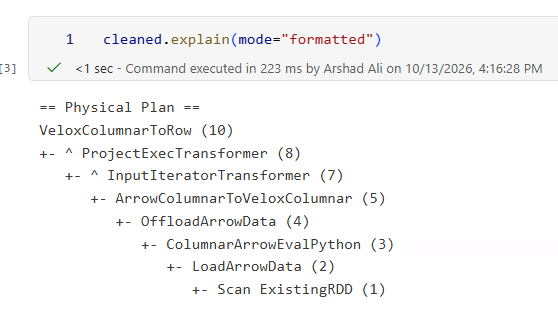
Physical plan from the Fabric notebook example. The displayed 223 ms is the time for the explain() command, not the UDF workload’s execution time.
Read the plan from the bottom up. Scan ExistingRDD supplies the sample rows, and ColumnarArrowEvalPython identifies the Python evaluation stage in the columnar Arrow path. ArrowColumnarToVeloxColumnar bridges that output into Velox’s columnar representation. Above it, ProjectExecTransformer and VeloxColumnarToRow show native projection and conversion back to rows.
Together, these native execution markers show how Python evaluation connects to native processing in this plan. They do not mean that the Python function itself has become native C++ or establish a measured speedup.
After an action, inspect the executed query in Spark UI, including the Gluten SQL / DataFrame tab and execution graph. Follow the UDF-containing portion of the plan and check native versus fallback nodes; Spark Advisor can also surface fallback alerts in notebook output. Pair that execution evidence with the output-consuming benchmark below.
Benchmark the output, not just the row count
One easy mistake is to time cleaned.count(). Spark may prune a projected UDF when only the number of rows is needed. You can end up timing a query that never evaluates the transformation.
Instead, use an action that consumes the UDF result. After replacing the sample data with representative input, this aggregate provides a small result while requiring the normalized strings to be evaluated:
from time import perf_counter
from pyspark.sql.functions import count, length, sum as spark_sum

started = perf_counter()
metrics = cleaned.agg(
    count("normalized_phone_number").alias("valid_numbers"),
    spark_sum(length("normalized_phone_number")).alias("total_characters"),
).collect()
elapsed_seconds = perf_counter() - started

print(f"Elapsed: {elapsed_seconds:.2f}s; metrics: {metrics[0].asDict()}")
This is an execution check, not a full benchmark harness. Counts and total lengths also do not prove that individual output values match.
For a useful comparison, run the same implementation on the same Runtime 2.0 build, once with NEE disabled and once enabled. Use spark.conf.set("spark.native.enabled", "false") or "true" to switch at the query level. Set it before reconstructing the DataFrame and running the action in each trial; restore the previous setting afterward. Do not reuse cached transformed output or a previously executed plan as evidence of a new path.
Only then compare implementations: built-ins, your existing scalar UDF, and a batch-oriented alternative. Changing the runtime, engine setting, UDF form, and cluster size together would make it impossible to attribute the result.
Adoption checklist
- Fix the inputs: use the same Delta snapshot or immutable input, partitioning, compute size, and dependency versions.
- Prove equivalence: compare outputs in both directions, including duplicates, nulls, invalid values, Unicode, and relevant numeric edge cases. Use explicit tolerances for floating-point results.
- Separate warm-up from measurement: repeat runs, alternate comparison order, and report the median and spread. Keep caching policy consistent and identify cold versus warm runs.
- Capture execution evidence: record the runtime build, settings, final plan, and fallback behavior for each variant.
- Measure the actual pipeline: add the production sink to end-to-end trials; include memory, spill, skew, retries, and available capacity metrics alongside duration.
- Roll out gradually: validate dependencies and representative jobs in a test environment, and retain a known-good runtime/environment configuration for rollback.
A useful results table has columns for implementation, runtime build, NEE setting, input size, median duration, variability, correctness, and observed fallback. A large isolated UDF improvement matters much less when scans, joins, or writes dominate the job.
Boundaries to keep in view
Not every Python library or nested operation is supported. Libraries that require arbitrary Python object serialization and some deeply nested operations can trigger fallback. Check the execution path, and validate your dependencies and error handling rather than relying on fallback to resolve every compatibility issue. Validate grouped, iterator, aggregate, and table-function APIs separately from the scalar and Pandas UDF examples here.
Python computation still costs CPU. Batch APIs do not guarantee GIL-free execution, and NEE does not make Python loops free. My advice is to profile the function and its dependencies before changing executor sizing. Base those decisions on measured CPU and memory behavior, not assumptions about interpreter placement or GIL contention.
Native execution does not turn Python into a built-in expression. NEE does not compile arbitrary Python into C++ or guarantee zero-copy execution. Catalyst can optimize eligible expressions around a UDF, but it cannot generally reason about the Python body as it can a built-in SQL expression. This is why built-ins remain the first choice when they express the rule clearly.
Side effects remain risky. Keep UDFs deterministic where possible and avoid per-row service calls or writes. Spark can retry tasks; external side effects need their own idempotency design. A reference-table join or separate batched enrichment step is often a better fit.
NEE coverage is not the same as Spark support. We don’t currently accelerate Structured Streaming or JSON/XML file scans through NEE. Those workloads can still run on the regular Spark engine in Runtime 2.0. Reading a JSON file and operating on an already-typed struct are also different questions.
We support ANSI mode with NEE on Runtime 2.0; on Runtime 1.3, ANSI mode triggers fallback. Keep the error semantics your pipeline requires and test them during migration rather than disabling ANSI mode to chase a performance gain. The runtime-specific limitations clarify this distinction; the UDF support page still carries a broader ANSI limitation.
The takeaway: keep useful Python, reduce avoidable overhead
With this capability, we’re making custom Python a more practical part of performance-sensitive Spark pipelines. You can keep useful Python logic and evaluate a better execution path before committing to a rewrite.
Start with one Python-heavy pipeline: enable NEE, inspect its execution plan, and compare it with your baseline using the checklist above. That gives you a concrete next step toward faster processing without giving up maintainable Python.
Sources and further reading
- Fabric Runtime 2.0: current runtime status, components, and environment selection.
- Python UDFs, Scala UDFs, and complex data types in NEE: documented support, benchmark figures, and limitations.
- Native Execution Engine overview: enablement, plan inspection, fallback, and runtime-specific limitations.
- Fabric Spark runtime releases and updates: check the build deployed to your environment before a rollout.
Note: This blog post was written with assistance from AI