Building a Medallion Architecture in Microsoft Fabric
A medallion architecture refines data through three stages: Bronze preserves source data, Silver validates and standardizes it, and Gold makes it useful for business analysis.
In Microsoft Fabric, two decisions shape that journey: where should the layers live, and how should their transformations run? Lakehouse schemas or separate lakehouses address the first; materialized lake views (MLVs) can simplify the second.
I recommend choosing ownership and governance boundaries before transformation tooling. This guide builds from those basics to a small retail example, then production considerations.
1. Start with the data contract, not three containers
Microsoft Fabric is an analytics platform; OneLake is its shared data lake. A lakehouse organizes files and tables. Delta Lake stores table data in Parquet files plus a transaction log, supporting reliable table updates. A schema is a namespace for tables inside a schema-enabled lakehouse.
Each layer needs a data contract: what its rows mean, the quality it guarantees, and how fresh the data must be.
| Layer | Purpose | Example | Contract to establish |
|---|---|---|---|
| Bronze | Preserve source evidence for replay and investigation | Orders as received, with ingestion metadata | Source identity, ingestion time, retention, replay |
| Silver | Produce validated, standardized, reusable data | Typed orders with valid identifiers and dates | Grain, keys, null handling, duplicates, corrections |
| Gold | Publish business-facing datasets | Daily order value by business date | Metric definition, currency, freshness, reconciliation |
Grain means what one row represents: one order, one order line, or one order per day. Establish it before joining or aggregating; otherwise, a technically successful pipeline can double-count business activity.
Bronze also needs a deliberate retention policy. A shortcut points to data in another location; pointing to a mutable source does not create an independent historical archive. Replay, privacy deletion, and source changes still need an explicit design.
For our example, each source row represents one order, all amounts use one currency, and dates are already normalized to the agreed business time zone. Zero-value orders are valid; negative values are invalid in this particular model. Refunds require their own defined treatment. The Gold output is daily order value, not a claim about accounting revenue recognition.
2. Choose lakehouses and schemas for the boundaries you need
A workspace groups Fabric items, such as lakehouses, notebooks, and pipelines, with administrative access roles. A capacity supplies shared compute resources.
Three refinement stages do not inherently require three physical lakehouses. Nor does placing them together make governance requirements disappear.
| Design | Best fit | Benefit | Trade-off |
|---|---|---|---|
| One lakehouse; Bronze, Silver, Gold schemas | One owning team with a common lifecycle and compatible access requirements | Fewer items, simpler local references and deployment | Shared administration; schema organization alone is not isolation |
| Separate layer lakehouses, optionally in separate workspaces | Independent owners, release cycles, or governance boundaries | Explicit ownership and item/workspace permissions | More permissions, dependencies, and deployment coordination |
| Shared Bronze; domain lakehouses with Silver/Gold schemas | Multiple domains consume common sources but own their products | Reuse ingestion while preserving domain ownership | Shared-source contracts, freshness, and change coordination remain essential |
The Fabric medallion architecture guidance recommends separate lakehouses and workspaces for layer separation. Our MLV tutorial also demonstrates schemas in one lakehouse as a learning setup, not a prescriptive reference architecture. These serve different purposes; a tutorial’s convenience should not become an enterprise security decision.
Evaluate a schema-based layout for a one-team pilot; retain it in production only if it meets required boundaries. Separate lakehouses provide item-level ownership boundaries. Workspace-administrator separation requires separate workspaces with appropriate role assignments. Do not consolidate an established governed design merely to adopt MLVs.
MLVs work with schema-based and multi-lakehouse layouts; cross-lakehouse refresh requires explicit scope and permissions.
Keep namespace, security, and compute separate
- Namespace: schemas organize tables. Portal-created lakehouses enable schemas by default; REST-based creation must enable them explicitly. MLVs require schema-enabled lakehouses.
- Security: OneLake security can scope access to schemas, tables, folders, rows, and columns. Workspace Admin, Member, and Contributor roles retain broad data access, so schema restrictions do not isolate privileged workspace administrators.
- Compute: three lakehouses do not automatically provide three dedicated compute pools. Capacity assignment and workload management determine compute sharing and contention.
Test consumer and refresh identities through their actual access paths: Spark, OneLake, the SQL analytics endpoint, and Power BI. The SQL analytics endpoint is the lakehouse’s T-SQL query surface. Successful notebook access does not prove that every consumer has the intended permissions.
3. What MLVs change in Spark execution
In a notebook-driven design, you often write each transformation, schedule notebooks in dependency order, maintain output tables, and build monitoring around that chain.
An MLV expresses a persisted result declaratively. Fabric executes the transformation and stores its output as a Delta table. Unlike a standard view, which stores a query definition and normally evaluates it when queried, an MLV lets consumers read the materialized result without rerunning the transformation at query time.
Fabric manages dependency-aware refresh and exposes lineage, the graph showing which tables and views depend on others, alongside run monitoring. This shifts work from imperative orchestration code toward reviewable transformation definitions.
Fabric manages refresh order; you configure when refresh runs. This is not automatic propagation immediately after every source commit.
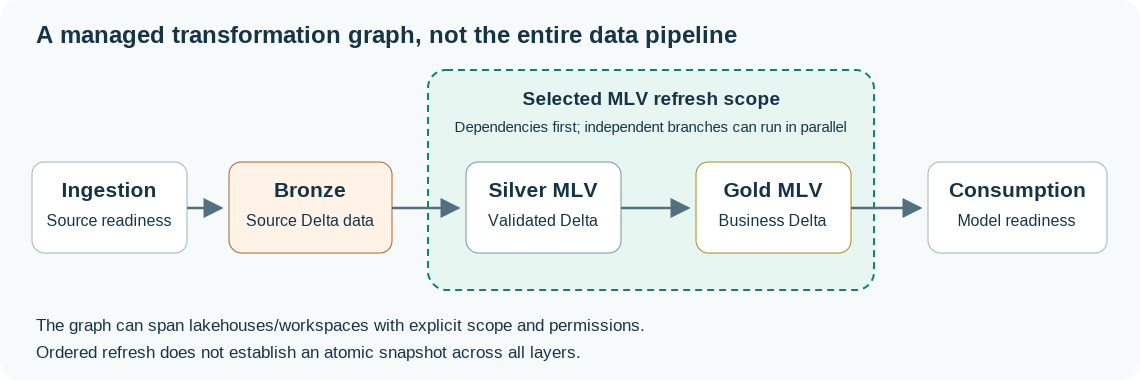
The benefit is not that Spark stops scanning, joining, or shuffling data. Full refresh still executes the transformation over its inputs; incremental refresh can reduce the amount of data processed when eligible. Materialization also uses storage.
Expect fewer custom transformation-scheduling components and potentially less repeated computation, not a guaranteed cost or latency reduction. Your team still owns ingestion readiness, business logic, permissions, recovery, and consumer freshness.
4. Build a small Bronze-to-Gold chain
What you’ll build: A Bronze Delta table containing sample orders, a Silver MLV that validates them, and a Gold MLV that calculates daily order counts and value. During lineage refresh, Fabric processes Silver before Gold when both are included in the refresh scope.
Use a fresh development lakehouse with schemas enabled, attached as the notebook’s default. You need Fabric-enabled capacity and Contributor-or-higher workspace access. Use a currently supported Fabric runtime compatible with Materialized Lake Views. Check the current MLV prerequisites and Fabric runtime lifecycle guidance before running this example.
Run the three blocks in order, each in a separate Spark SQL notebook cell. The %%sql magic
selects Spark SQL; these are not T-SQL commands for the SQL analytics endpoint, which cannot
insert, update, or delete lakehouse table data.
Layer schemas replace the default dbo namespace here. The Gold fact_ name identifies an
analytical output with one row per date.
Create two Bronze orders
Run this setup once in the fresh demo lakehouse. It is a learning fixture, not an ingestion pipeline:
%%sql
CREATE SCHEMA bronze;
CREATE TABLE bronze.orders (
  order_id BIGINT,
  order_date DATE,
  amount DECIMAL(18,2)
) USING DELTA;

INSERT INTO bronze.orders VALUES
  (1, DATE '2026-11-22', 100.00),
  (2, DATE '2026-11-22', 50.00);
The source must contain unique order identifiers at the stated grain. The Silver check validates individual rows; it does not deduplicate orders or enforce uniqueness.
Enable source change tracking and create Silver
Delta Change Data Feed (CDF) records row changes for downstream incremental processing. Enable it on the directly referenced source:
%%sql
CREATE SCHEMA IF NOT EXISTS silver;
CREATE SCHEMA IF NOT EXISTS gold;

ALTER TABLE bronze.orders
SET TBLPROPERTIES (
  'delta.enableChangeDataFeed' = 'true'
);

CREATE MATERIALIZED LAKE VIEW
silver.valid_orders
(
  CONSTRAINT valid_order CHECK (
    order_id IS NOT NULL
    AND order_date IS NOT NULL
    AND amount IS NOT NULL
    AND amount >= 0
  ) ON MISMATCH FAIL
)
TBLPROPERTIES (
  'delta.enableChangeDataFeed' = 'true'
)
AS
SELECT order_id, order_date, amount
FROM bronze.orders;
FAIL makes a quality violation explicit instead of publishing a partially accepted result. The
IS NOT NULL guards matter: comparisons alone are not a complete null-validation policy.
ON MISMATCH DROP is an alternative when exclusion is intentional. It drops nonconforming rows
and reports counts; it does not create a quarantine table. Preserve rejected records
separately if investigation or regulatory retention requires them.
For wider validation, use separately registered column-level quality suites for completeness and uniqueness, plus reconciliation checks. See the data-quality guide.
Create and query Gold
Gold reads Silver, so Bronze CDF alone is insufficient. The Silver definition above also enables CDF on its materialized result:
%%sql
CREATE MATERIALIZED LAKE VIEW
gold.fact_daily_order_value
AS
SELECT
  order_date,
  COUNT(*) AS order_count,
  SUM(amount) AS total_order_value
FROM silver.valid_orders
GROUP BY order_date;

SELECT order_date, order_count,
       total_order_value
FROM gold.fact_daily_order_value
ORDER BY order_date;
Creation materializes the initial results, so the query returns the first outcome below. Later refreshes are not necessarily incremental; inspect the actual decision.
Validate success and failure, not just object creation
After a Bronze change, open Lakehouse > Materialized lake views > Manage > Manage schedules. Create a refresh configuration using Refresh all materialized lake views for this small demo, so Silver runs before Gold. Name it and choose a time-based cadence, then save it. Select Run beside the schedule for an immediate refresh. Check Recent runs before querying Gold again; running Gold alone does not refresh Silver.
Use controlled source changes to test the following:
| Test | Expected business outcome |
|---|---|
| Two valid orders on one date, valued at 100 and 50 | Gold shows two orders and total value 150 |
| Append a third valid order valued at 25 | After successful refresh, Gold shows three orders and 175 |
| Introduce a negative or null amount | Silver fails its quality check; investigate the run rather than declaring the chain fresh |
| Correct or delete an existing order | Reconcile Gold with the current source; verify whether refresh is incremental or full |
An older Gold result may remain readable after a failed refresh. Readable does not mean current. Track the last successful refresh and agreed source watermark, the source batch or version successfully processed into the output, not just whether a query returns rows.
These are illustrative validation targets, not measured Fabric results.
5. Understand skip, incremental, and full refresh
For SQL-defined MLVs with optimal refresh, Fabric evaluates the available strategy when a refresh runs. It can skip unchanged work, process changes incrementally, or rebuild the result.
| Strategy | What happens | What to check |
|---|---|---|
| Skip / no refresh | Avoid recomputing an eligible unchanged result | Delta sources and detected changes |
| Incremental | Update the materialized result from relevant source changes | CDF on every directly referenced upstream table/MLV, query eligibility, mutation handling |
| Full | Recompute the result from its inputs | Input size, query cost, refresh duration, capacity contention |
SUM and COUNT, without DISTINCT, support incremental refresh without additional source
partitioning requirements. CDF must be enabled on every directly referenced Delta table or
MLV, and the remaining query and data-change requirements must be satisfied. Other aggregates,
such as AVG, require source partitioning and partition columns in GROUP BY; mixing them
applies the stricter conditions to the query.
DISTINCT, window functions, and nondeterministic expressions can force full refresh. Joins
also have eligibility conditions. Even an eligible query can receive a full refresh when Fabric
determines that is cheaper.
This example declares no refresh hints: expect full-refresh fallback for source updates and deletes rather than incremental mutation handling.
Advanced: mutation hints and other authoring paths
Refresh hints are Preview and can enable incremental updates/deletes with compatible unique keys. Fabric trusts declared uniqueness without runtime validation; incorrect keys can threaten correctness. Validate keys and follow the hint prerequisites. Use full refresh when those conditions cannot be assured.
Match CDF retention to refresh and outage windows. Test corrections, deletes, and the documented full-refresh recovery path after a prolonged pause, not just appends.
PySpark MLV authoring is Preview and currently uses full refresh. Non-Delta sources also use full refresh. SQL definitions are a useful starting point when eligible incremental processing is a priority.
6. Advanced: connect the graph to a production pipeline
MLVs can replace much of the custom notebook sequencing between Bronze, Silver, and Gold. They do not replace source connectivity, external change data capture (CDC), every transformation, or downstream publication. Source CDC brings changes from external systems; Delta CDF exposes changes already written to Delta tables.
Keep the end-to-end workflow explicit:
- Ingest: land and validate source data; establish the batch or watermark that is ready.
- Transform: refresh the selected MLV lineage and monitor its result.
- Publish: confirm required outputs are current, then coordinate consumers where needed.
USING OneLake_Files can ingest supported CSV/Parquet files already in OneLake. It does not
replace bringing those files from external systems. API calls, ML inference, custom stateful
logic, and subsecond streaming can still require other processing tools.
Cross-lakehouse dependencies are supported, not implicit
Extended lineage traces dependencies across lakehouses and workspaces. Scheduled or ad-hoc runs can include selected upstream lakehouses, execute dependencies first, and run independent branches in parallel.
Visible lineage is not refresh scope. Shortcuts are source entities; access through one does not imply upstream MLV refresh. Verify included dependencies and the execution identity’s source-read and MLV-refresh permissions; inaccessible or faulted nodes can block execution. See the graph execution guidance.
Dependency order is also not a global atomic transaction across all layers. If consumers require a coordinated business snapshot, define a batch/watermark contract and verify every required output before marking it ready.
Pick the trigger that matches the workflow
- MLV lineage schedules: support selected-view refresh scope; time-based scheduling has a minimum effective interval of five minutes.
- Event-triggered refresh: Preview; verify supported event sources and Private Link restrictions before designing around it.
- Data Factory Refresh Materialized Lake View activity: currently refreshes all MLVs in the selected lakehouse. It does not support service-principal or workspace-identity authentication; do not generalize this activity-specific restriction to every MLV API.
Overlapping refreshes can be skipped, and refresh runs exceeding 24 hours fail. Design freshness monitoring around successful completion, including contention and skipped runs.
For Power BI, an Import semantic model copies data and needs a coordinated refresh. A Direct Lake model reads OneLake data, but its readiness still needs validation rather than assuming consumers immediately see refreshed Gold.
7. Adopt with a measurable production contract
Compare the existing notebook implementation and the MLV version using the same data, business logic, freshness objective, and comparable capacity conditions.
| Measure | Why it matters |
|---|---|
| End-to-end freshness and last successful watermark | A fast transform can still feed a stale dashboard |
| Refresh duration, strategy, and capacity consumption | Shows whether incremental processing actually helps |
| Failure, skipped-run, and recovery behavior | Reveals operational reliability under contention and bad data |
| Row counts, key uniqueness, rejects, and reconciled totals | Confirms semantic equivalence, not merely successful execution |
| Custom orchestration components and maintenance effort | Makes the simplification benefit visible |
Do not report pipeline-component reduction as a compute benchmark. MLVs can reduce operational overhead even when full-refresh compute is similar; incremental refresh can improve compute efficiency without fixing an upstream ingestion delay.
Adoption checklist
- Define grain, metric semantics, replay/retention, and acceptable freshness.
- Choose schema/item/workspace boundaries and test real consumer and refresh identities.
- Pilot one SQL chain; configure CDF on each directly referenced input where incremental refresh is intended.
- Test appends, corrections, deletes, duplicates, nulls, failed refreshes, and recovery.
- Inspect actual refresh strategy and reconcile outputs against the existing implementation.
- Make ingestion readiness, refresh scope, and consumer publication explicit.
- Assign owners, alerts, deployment procedures, and a fallback before replacing production orchestration.
Keep business logic in version-controlled definitions. Avoid rebuilding a large imperative wrapper around MLVs unless it serves an end-to-end responsibility the managed graph does not cover.
8. The recommendation: simplest boundaries, managed transformations
Use schemas for organization; lakehouses and workspaces for the ownership and administrative separation you actually require. Neither layout is universally best, and moving to MLVs does not require collapsing governance boundaries.
Use MLVs where declarative persisted transformations fit. Let Fabric manage the scoped dependency graph, while keeping ingestion, correctness, recovery, and consumer readiness explicit.
Your next step is small: choose one Bronze-to-Gold chain, state its data contract, and compare its refresh behavior and operational burden with the current implementation.
References and further reading
- Architecture and layout: Medallion lakehouse architecture explains the layer-separated baseline; lakehouse schemas covers namespaces and creation.
- Access boundaries: Get started with OneLake security explains permission scope and workspace-role implications; the SQL analytics endpoint explains T-SQL capabilities and write restrictions.
- MLV foundations: MLV overview explains managed materialization; getting started covers prerequisites and first execution; the tutorial provides a hands-on schema-based learning setup.
- Definitions and quality: Spark SQL reference covers creation and properties; data quality covers constraints and quality suites.
- Refresh mechanics: Refresh strategies covers eligibility; updates and deletes explains Preview refresh hints and key requirements.
- Graph execution: View lineage and schedule lineage runs explain cross-lakehouse scope, permissions, and scheduling limits.
- Pipeline integration: Refresh Materialized Lake View activity describes its lakehouse-wide scope and authentication restrictions.
Note: This blog post was written with assistance from AI